


<< 학습 목표 >>
1. DB와 관련된 모든 자원을 close 해야하는 이유를 설명할 수 있다.
2. DB와 관련된 모든 자원을 close 하는 코드를 작성할 수 있다.
지금까지 우리가 INSERT, UPDATE, DELETE, SELECT 쿼리를 보내고 결과를 받아오는 방법을 봤음
여기서 항상 Connection 을 close 해줬음
Connection을 close 해줘야하는 이유는 앞서 설명했듯이 close 를 하지 않으면 디비는 접속한 자바에서 여전히 실행할 쿼리가 남아있다고 판단해 접속을 유지함
close 를 하지 않은 상태에서 다른 자바(DAO)에서 접속을 하려고 한다면 "이미 다른 자바가 접속해있다" 와 비슷한 예외 메세지가 출력됨
그래서 반드시 close 를 해줘야함
close 를 해야하는 이유를 정확히 얘기한다면 완전히 달라지지만 지금 정확하게 얘기한다면 다른 분야의 얘기로 깊게 들어가야하므로 이렇게만 이해해도 충분함
우리가 Connection 을 close 하면 내부적으로는 다음과 같은 순서로 close가 됨
1. PreparedStatement 가 있을 경우 PreparedStatment 를 close 함
2. Connection 을 close 함
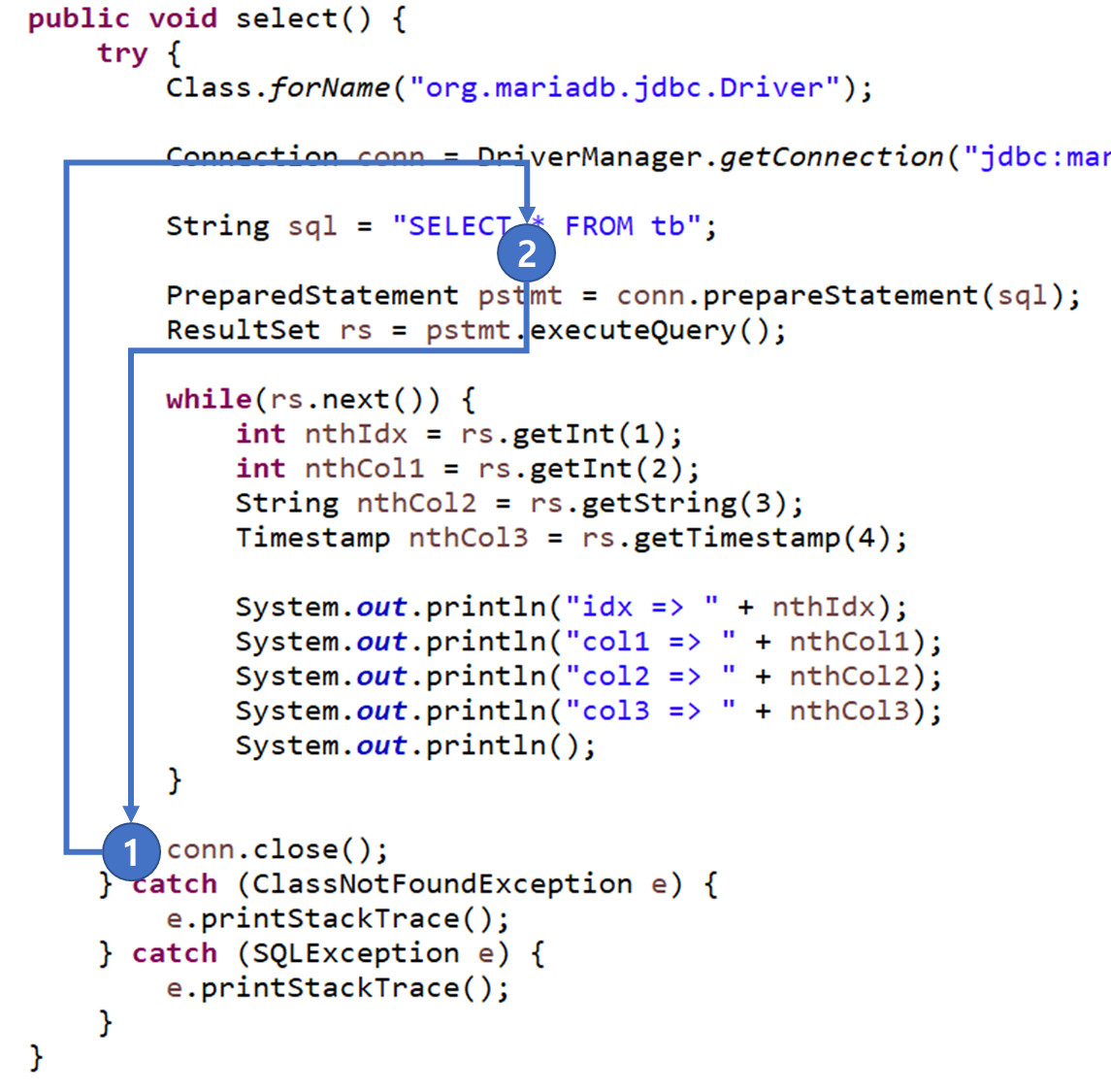
이전 글에서 사용한 select 메서드의 conn.close 메서드의 동작 순서를 통해 시각적으로 close 순서를 보자
우리는 select 메서드의 마지막에 conn.close 메서드를 호출(1) 했지만 close 메서드의 내부에서는 PreparedStatment가 있으니 먼저 PreparedStatment 를 close 함(2)
그 후 Connection을 close 함 (1)
또한 PreparedStatement 를 close 하면 내부적으로는 다음과 같은 순서로 close가 됨
1. ResultSet이 있을 경우 ResultSet을 close 함
2. PreparedStatement 를 close 함
우리는 Connection 을 close했지만(1) Connection의 close 메서드 동작 순서에 의해 PreparedStatment가 close 됨(2)
또한 PreparedStatement가 close 되지만 PreparedStatment의 close 메서드 동작 순서에 의해 먼저 ResultSet이 close 됨(3) 그 후 PreparedStatment가 close 되고(2) 마지막으로 Connection이 close 됨(1)
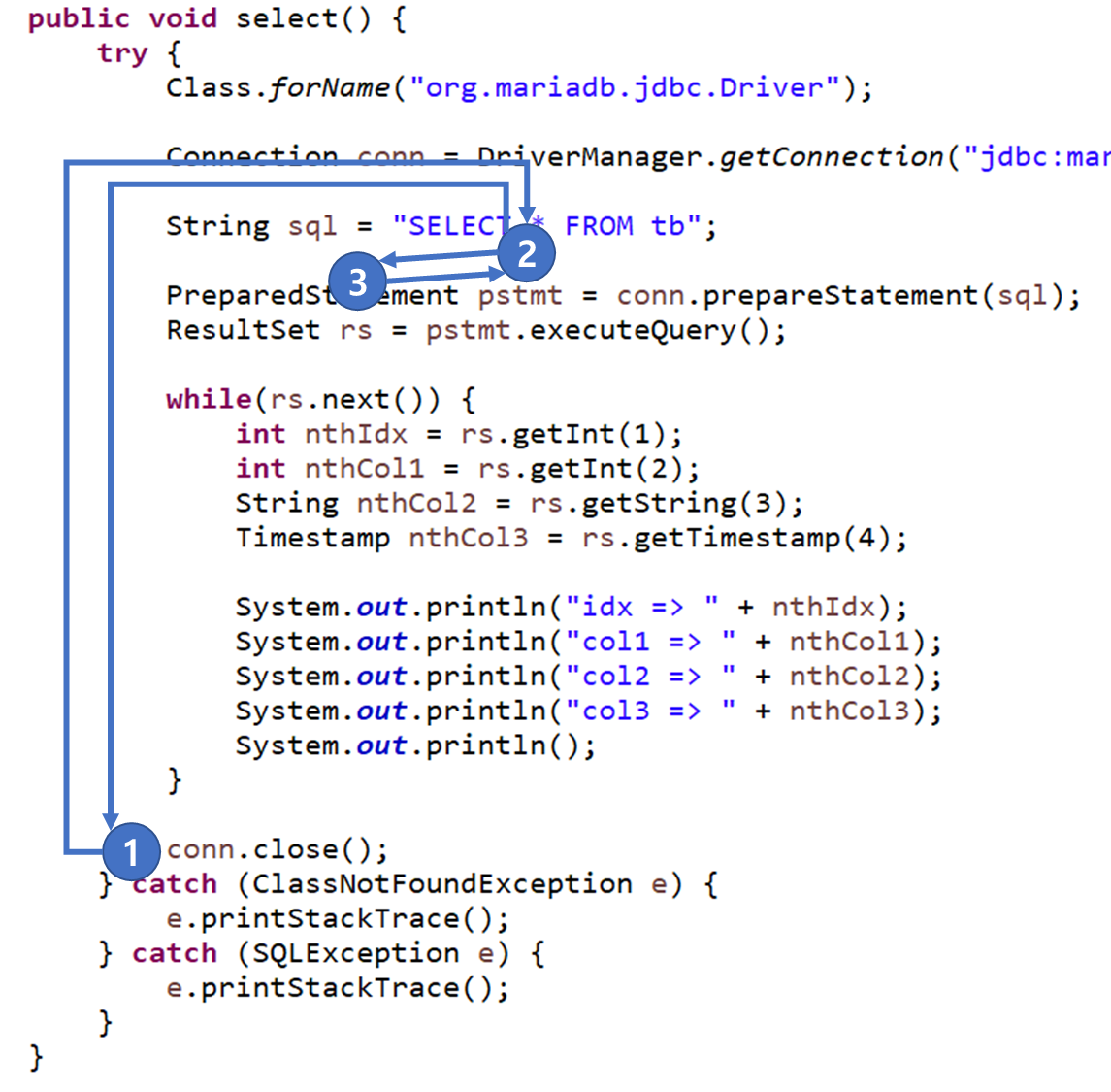
그림이 다소 복잡해 보이니 간단하게 소스 코드로 보면 아래와 같은 순서로 close 가 됨

내부적으로 위와 같이 동작하는 것처럼 DB를 사용하고 나면 DB와 관련된 모든 자원을 반드시 close(해제) 해줘야 DB와의 접속이 완전히 끊김
자바는 어떤 코드가 동작할 때 예외가 발생할 가능성이 있음
close메서드도 마찬가지로 어떤 이유로 예외가 발생해 close 메서드가 호출되지 못할 수 있음
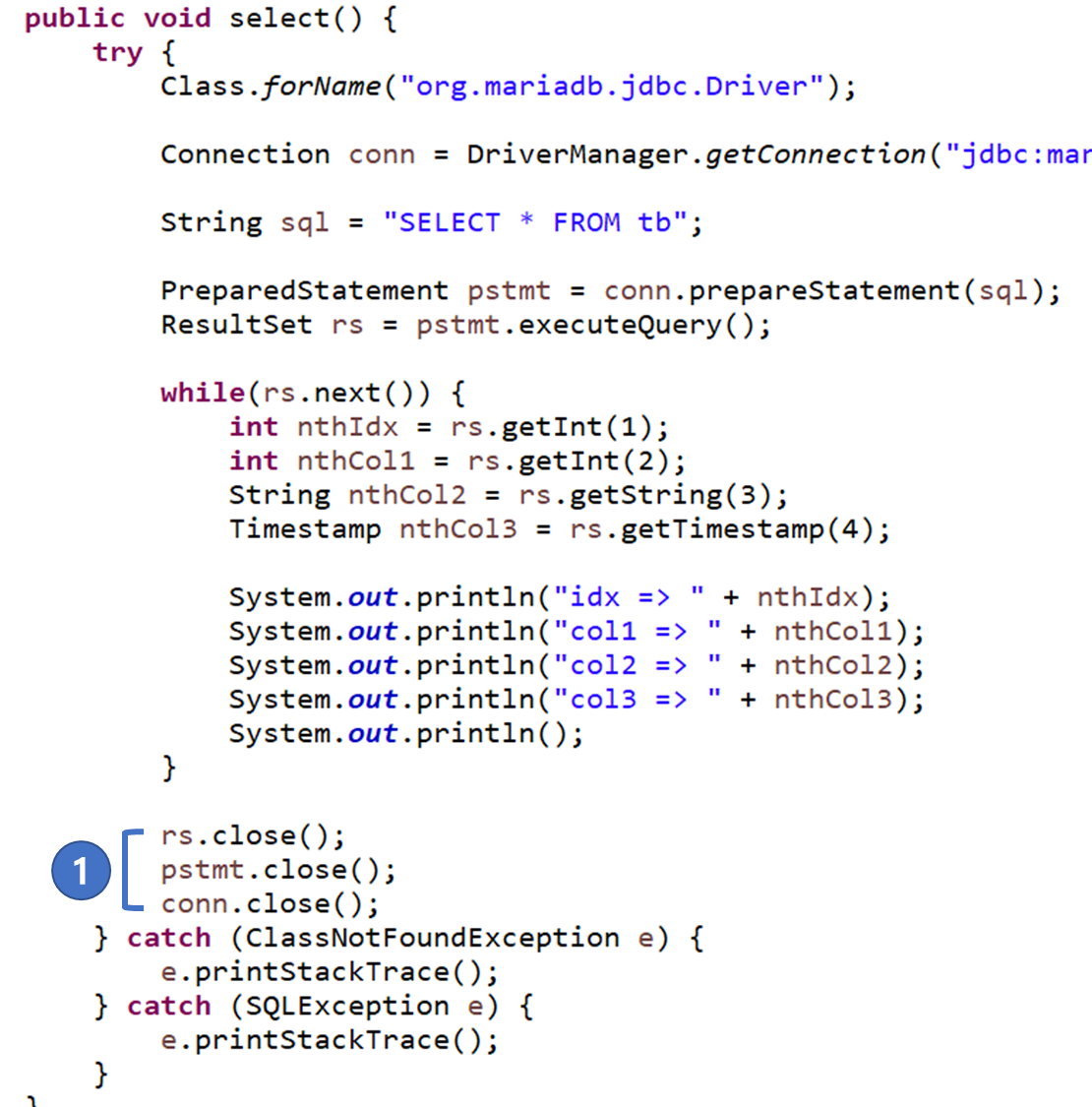
그래서 DAO 에서는 Connection 객체만 close 하면 안되고 직접 ResultSet, PreparedStatement, Connection 순서로 close메서드를 호출해주는게 권장하는 close 방식임(1)
그.러.나 이 권장하는 방식에도 문제는 있음
rs.close() 메서드 위에 마우스를 올려둬 ResultSet 객체의 close 메서드 설명을 보자

ResultSet 객체의 close 메서드는 SQLException을 발생시킬 가능성이 있음
ResultSet 객체의 close 메서드를 호출했을 때 SQLException이 발생하는 경우는 무수히 많으니 언제, 왜 발생한다고 명확하게 말할 순 없지만 중요한 점은 ResultSet 객체의 close 메서드가 예외를 발생시킬 가능성이 있다는 것
만약 rs.close() 메서드를 호출(1)했는데 예외가 발생했다면?
그 밑에 있는 pstmt.close(), conn.close() 메서드가 호출되지 못하고 catch 로 이동함(2)
그렇다는건? DB와 관련된 자원을 close 하지 못한다는 것
조금 전 위에서 반드시 DB와 관련된 모든 자원은 "반드시" close 를 해줘야한다고 했는데 close가 되지 못하는 상황이 발생함

그!래!서! DB와 관련된 모든 자원을 반드시 close 하기 위해서는 일반적으로 다음과 같이 코드를 작성함
public void select() {
	Connection conn = null;
	PreparedStatement pstmt = null;
	ResultSet rs = null;

	try {
		Class.forName("org.mariadb.jdbc.Driver");

		conn = DriverManager.getConnection("jdbc:mariadb://localhost:3306/practice?user=root&password=0000");

		String sql = "SELECT * FROM tb";

		pstmt = conn.prepareStatement(sql);
		rs = pstmt.executeQuery();

		while(rs.next()) {
			int nthIdx = rs.getInt(1);
			int nthCol1 = rs.getInt(2);
			String nthCol2 = rs.getString(3);
			Timestamp nthCol3 = rs.getTimestamp(4);

			System.out.println("idx => " + nthIdx);
			System.out.println("col1 => " + nthCol1);
			System.out.println("col2 => " + nthCol2);
			System.out.println("col3 => " + nthCol3);
			System.out.println();
		}
	} catch (ClassNotFoundException e) {
		e.printStackTrace();
	} catch (SQLException e) {
		e.printStackTrace();
	} finally {
		try {
			if(rs != null) {
				rs.close();
			}
		} catch (SQLException e) {
			e.printStackTrace();
		}

		try {
			if(pstmt != null) {
				pstmt.close();
			}
		} catch (SQLException e) {
			e.printStackTrace();
		}

		try {
			if(conn != null) {
				conn.close();
			}
		} catch (SQLException e) {
			e.printStackTrace();
		}
	}
}
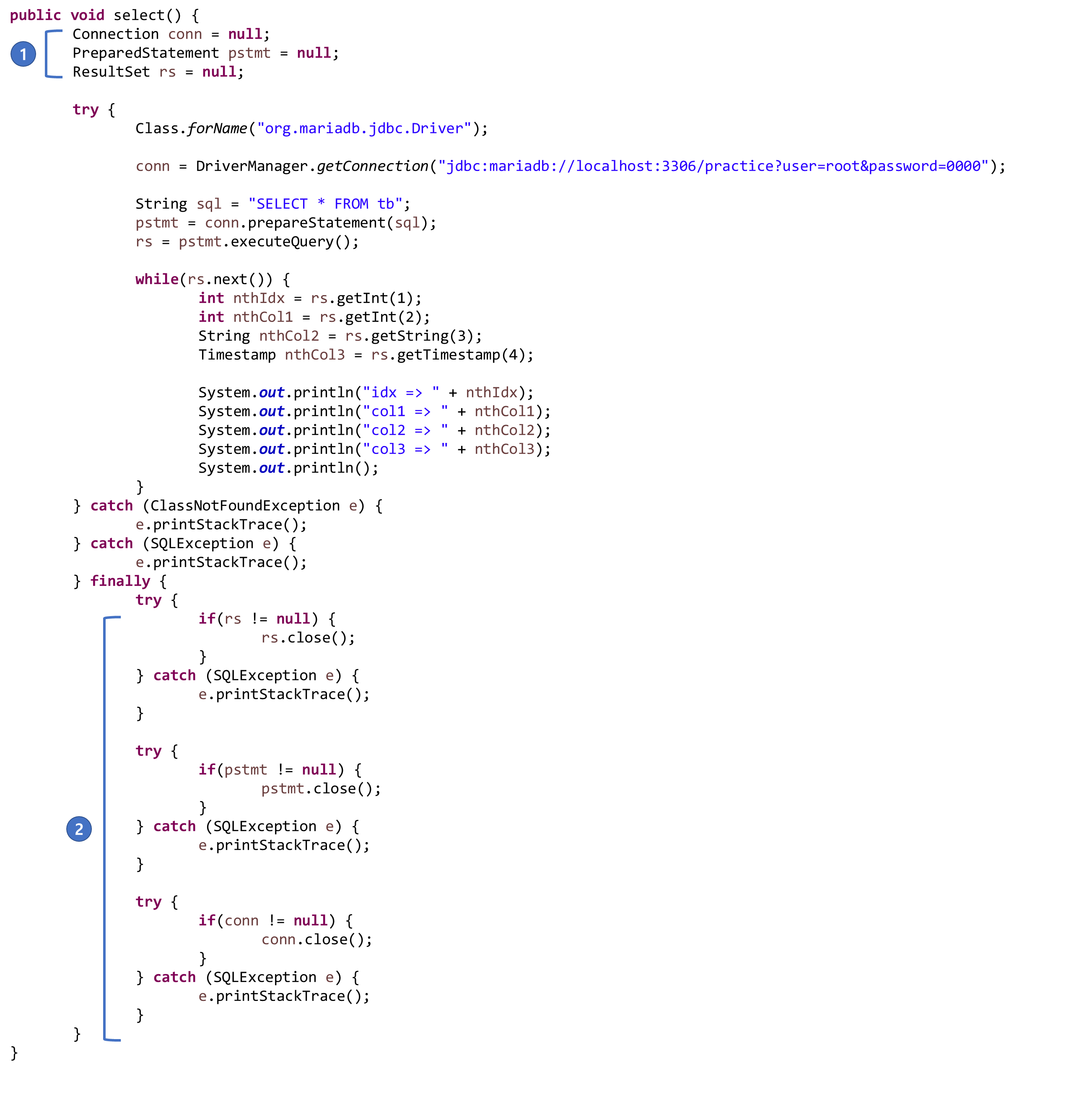
DB와 관련된 모든 자원을 try 바깥에 선언하면서 null 상태로 만듬(1)
close 를 try 의 끝에서 하지 않고 finally 에서 함(2)
자바에서 배웠듯 finally 는 예외가 발생 여부에 상관 없이 무조건 동작하는 코드이므로 "반드시" 가 됨
finally 에서 각 객체의 null 여부를 확인하는 이유는 각 객체를 선언한 후 null로 설정을 했기 때문임
오타나 어떤 이유로 인해 class.forName 메서드에서 ClassNotFoundException 예외가 발생한다면(1) catch로 이동(2) 후 finally 가 동작(3)을 하게 되는데 이때 각 객체가 null인 상태이므로 null 여부를 체크하지 않으면 finally 에서 또 다시 NullPointerException이 발생함
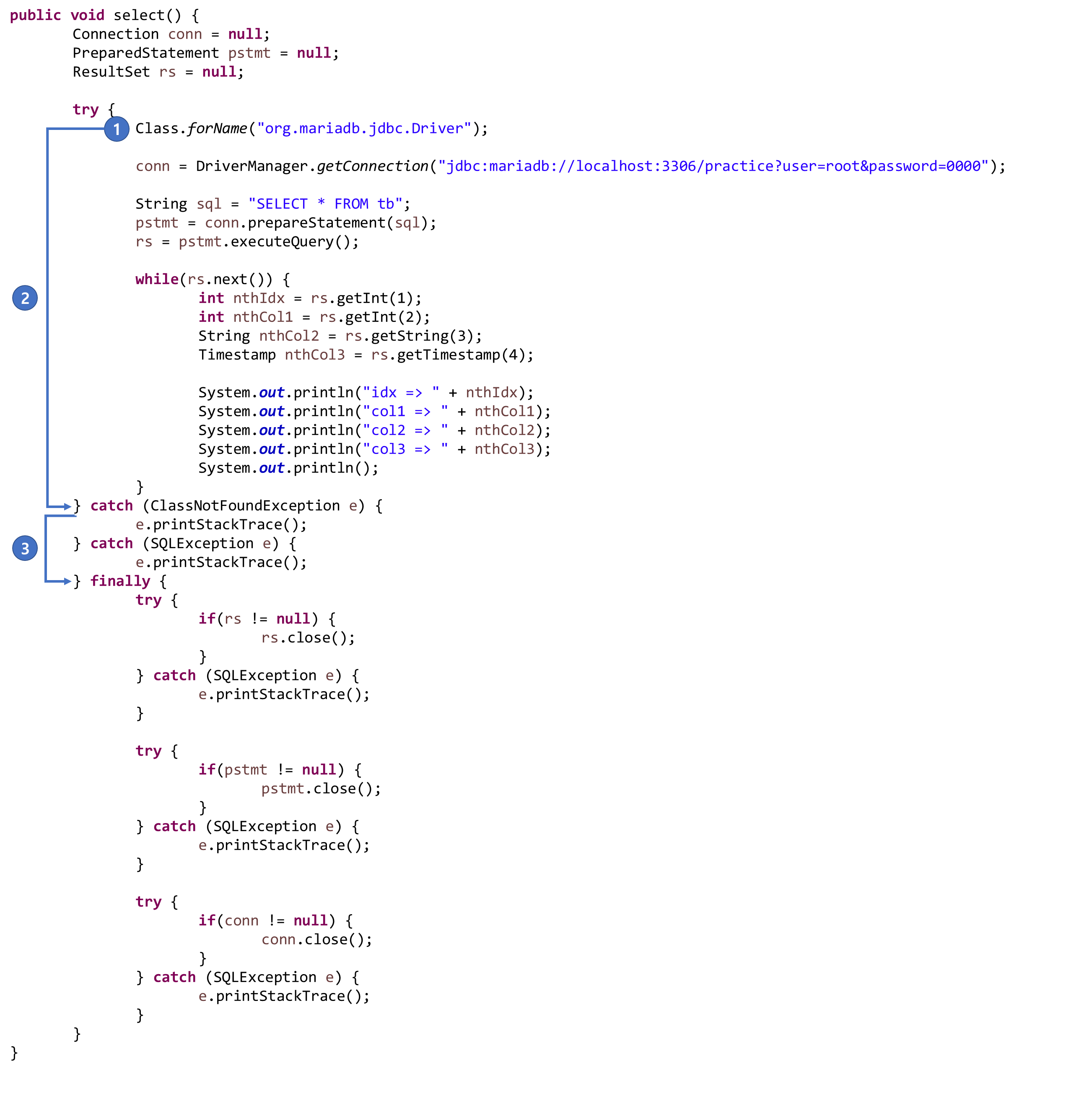
일반적으로 DAO의 메서드들은 이와 같은 형태의 코드를 가지니 앞으로 자주보게 될 코드
만약 "왜 코드를 이렇게 써야하지?" 라고 생각이 든다면 지금 단계에서는 가장 마지막에 보여준 finally 까지 포함된 코드를 외우는게 편할 것
DAO 내 select 메서드 코드가 굉장히 길어졌음
그 이유는 쿼리를 보내기 위한 준비(DB 접속) 코드와 접속을 끊는 코드가 덧붙어서 굉장히 길어졌음
또 DAO의 매 메서드 마다 쿼리를 보내기 위한 준비와 접속을 끊는 코드가 매번 추가되야하므로 별도의 메서드로 빼두는게 좋음
다음과 같이 Utility 패키지에 DBUtil 클래스를 만들고 아래 코드를 추가하자
package utility;

import java.sql.Connection;
import java.sql.DriverManager;
import java.sql.PreparedStatement;
import java.sql.ResultSet;
import java.sql.SQLException;

public class DBUtil {
	private static final String DRIVER_NAME = "org.mariadb.jdbc.Driver";
	private static final String DB_URL = "jdbc:mariadb://localhost:3306/practice?user=root&password=0000";

	public static Connection getConnection() {
		Connection conn = null;

		try {
			Class.forName(DRIVER_NAME);

			conn = DriverManager.getConnection(DB_URL);
		} catch (ClassNotFoundException e) {
			e.printStackTrace();
		} catch (SQLException e) {
			e.printStackTrace();
		}

		return conn;
	}

	private static void close(Connection conn) {
		if(conn != null) {
			try {
				conn.close();
			} catch (SQLException e) {
				e.printStackTrace();
			}
		}
	}

	private static void close(PreparedStatement pstmt) {
		try {
			if(pstmt != null) {
				pstmt.close();
			}
		} catch (SQLException e) {
			e.printStackTrace();
		}
	}

	private static void close(ResultSet rs) {
		try {
			if(rs != null) {
				rs.close();
			}
		} catch (SQLException e) {
			e.printStackTrace();
		}
	}

	public static void closes(Connection conn, PreparedStatement pstmt) {
		closes(conn, pstmt, null);
	}

	public static void closes(Connection conn, PreparedStatement pstmt, ResultSet rs) {
		close(rs);
		close(pstmt);
		close(conn);
	}
}
그리고 DAO의 select 메서드를 다음과 같이 바꿔 코드를 줄이자
public void select() {
	Connection conn = null;
	PreparedStatement pstmt = null;
	ResultSet rs = null;

	try {
		conn = DBUtil.getConnection();

		String sql = "SELECT * FROM tb";

		pstmt = conn.prepareStatement(sql);
		rs = pstmt.executeQuery();

		while(rs.next()) {
			int nthIdx = rs.getInt(1);
			int nthCol1 = rs.getInt(2);
			String nthCol2 = rs.getString(3);
			Timestamp nthCol3 = rs.getTimestamp(4);

			System.out.println("idx => " + nthIdx);
			System.out.println("col1 => " + nthCol1);
			System.out.println("col2 => " + nthCol2);
			System.out.println("col3 => " + nthCol3);
			System.out.println();
		}
	} catch (SQLException e) {
		e.printStackTrace();
	} finally {
		DBUtil.closes(conn, pstmt, rs);
	}
}'Servlet + JSP > Serlvet-Chapter04' 카테고리의 다른 글
| Chapter04. Connection Pool 을 사용한 DB 연동 (0) | 2023.03.08 |
|---|---|
| Chapter04. CRUD 프로젝트 / 회원가입 (0) | 2023.03.07 |
| Chapter04. 자바에서 쿼리 보내고 결과 받기 / SELECT (0) | 2023.03.06 |
| Chapter04. 자바에서 쿼리 보내고 결과 받기 / INSERT, UPDATE, DELETE (0) | 2023.03.06 |
| Chapter04. 자바와 DB 연동 (0) | 2023.03.04 |